01
They book at any time, in genuinely available slots
The portal shows only genuinely available slots according to your schedules and rules, even at 11 at night.
Every call to book or change an appointment, or to ask "what time was my appointment?", is time your business loses. The Intelidatia customer portal handles it for you: clients book online based on your actual availability, see their upcoming appointments, update their details and also book for their children or dependants. Each booking lands in your management dashboard like any other.
Why it matters
What you handle today through calls and messages, your client can do from the portal. Everything ends up in your dashboard.
01
The portal shows only genuinely available slots according to your schedules and rules, even at 11 at night.
02
A new visitor can book by entering only their name and phone number. The barrier to booking is kept low.
03
A mother books for her children; a son books for his elderly father. The portal supports dependants, each with their own appointment.
04
The customer sees their upcoming appointments and history in their area. That call is no longer made to you.
05
They update their details, receive business notifications and check their messages in the same portal.
06
The portal is not an island: it writes directly to your calendar. You see each booking in real time and manage it like any other appointment.
How it works
Three steps your client completes independently, at any time, from their phone.
01
From the booking button on your website, whenever it suits them.
02
The portal shows only the slots that are genuinely available, according to your schedules and booking rules.
03
You see it arrive immediately and the client sees it in their portal. Nobody has to pick up the phone.
On screen
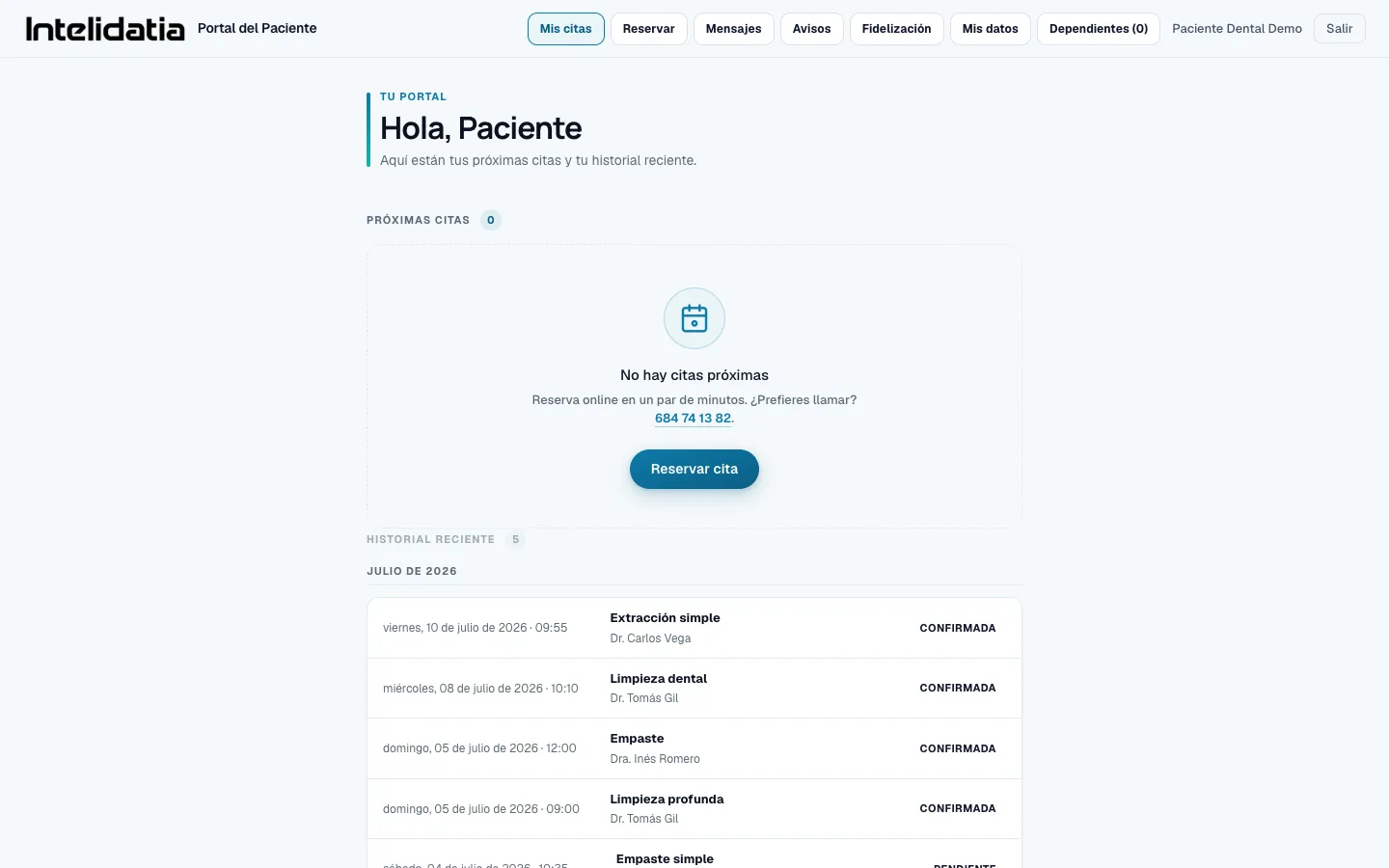
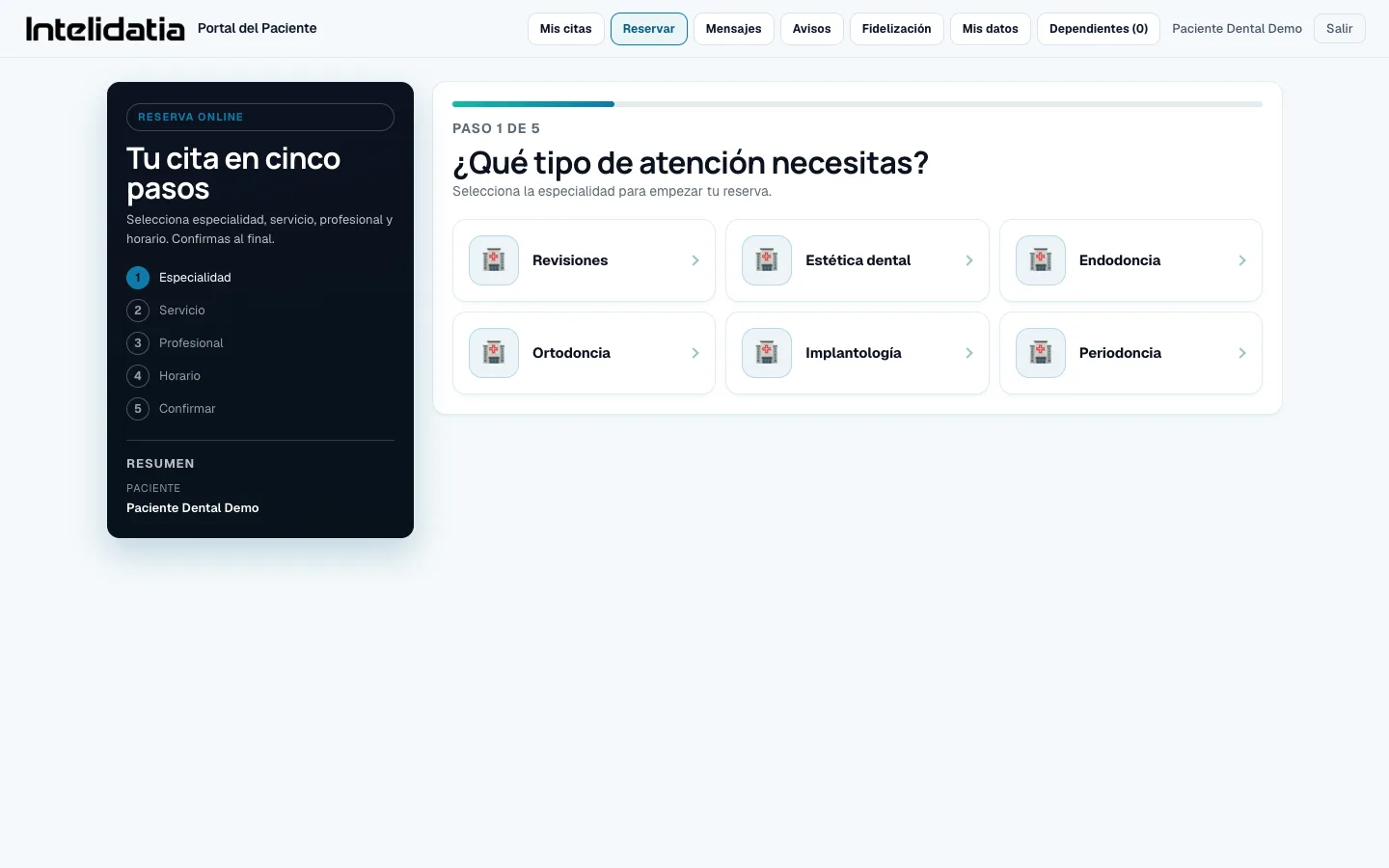
Real screenshots of the customer portal, with the dental SYSTEM sample account.
Features
Everything the portal offers your clients today. Each point exists and works; no "coming soon".
Choose a service, professional, day and time based on your real availability, then confirm. Guided, with no getting lost.
To book an appointment, there is no need to create an account: a name and phone number are enough. The request reaches your dashboard for you to confirm.
From their account, your client can also book for their children or dependants, each with their own client record.
Upcoming appointments and history, always to hand. The question "when was my appointment?" answers itself.
Their profile and contact details, which they can edit themselves. Fewer outdated client records in your dashboard.
If you activate the loyalty programme, the customer sees their benefits and progress in the portal.
The customer receives business notices and checks their messages in their area, without getting lost between SMS and calls.
Clients sign in with an email and password, or with Google if you enable it for your business.
The portal is web-based: it works in the browser of any phone or computer, without downloading anything.
Comparison
Point by point, what changes when the client self-manages.
| Dimension | Intelidatia | Make an appointment by phone / individual messages |
|---|---|---|
| When clients can book | At any time, even with the business closed | Only when someone can pick up the phone |
| See availability | Real available slots on screen, in real time | "Wait a second, I'll check the calendar..." |
| Change or check an appointment | The client checks it in their own portal | Another call to answer |
| Book for a family member | From the same account, each with their own client record | Explain it over the phone and write it down by hand |
| Where is the booking | On your dashboard, in real time | In the notebook, if you wrote it down correctly |
| Customer data | They keep it up to date themselves | They are requested and rewritten every time |
Complete System
Website, WhatsApp and portal: three entry points, one calendar. Everything flows into your dashboard.
Frequently asked questions
What we are usually asked about the area from which your clients book.
It is the online area where your clients manage their own bookings: they book based on your real availability, see upcoming appointments and history, update their details and receive your notifications. Each booking is saved in your management dashboard.
Not necessarily. They can book by entering only their name and phone number, without creating an account. The request reaches your dashboard for you to confirm. If they create an account, they can also see their appointments and details and book for family members.
Yes. From their account, a client can book for dependants (children or elderly parents), each with their own client record and appointments. This is especially useful in clinics and consultations.
No: it is a web portal. It works in the browser of any mobile phone or computer, without going through any application store or taking up memory.
Yes. The portal calculates availability based on your schedules, professionals and booking rules (minimum notice, slot duration and buffers). If a slot has just been filled, it is no longer offered.
With their email and password, or with Google if you activate that option for your business. On first access, they complete their profile, which is then linked to their client record in your dashboard.
In your management dashboard in real time, alongside website and WhatsApp appointments. You manage them exactly like any other appointment.
Yes: clinics, physiotherapy, veterinary, hairdressers, aesthetics, psychology, nutrition and any business with appointments, throughout Spain. The portal uses your services and your real professionals.
The portal is part of the Intelidatia System (website + bookings + dashboard), with tailored pricing and no commissions per appointment. We give you the exact number in a 10-minute call, without obligation.
Let’s talk
Tell us what you need. No commitment. A WhatsApp message is enough.
Direct contact
Save manual work, connect tools, control operations or open a new channel. Let’s start with the result.
We use essential technical cookies and, only with your permission, analytics cookies (Google Analytics) to understand and improve the site. Nothing optional is activated until you decide. Read the cookie policy.