01
Appointments arrive automatically
Requests from the website arrive in the dashboard. Other channels connect only if they are part of the approved scope.
The base product connects the website with requests or reservations, the calendar and appointment statuses. The technical catalogue supports other modules, but advanced client records, WhatsApp, reminders, time tracking and billing are only added when they appear in an approved proposal.
Why it matters
Everything you currently keep in your notebook, Excel and mobile WhatsApp, together and organised in one dashboard.
01
Requests from the website arrive in the dashboard. Other channels connect only if they are part of the approved scope.
02
Reminders and customer reactivation require rules, a provider, permissions and testing; they are not included in the base product.
03
The base product limits the data to contact and appointment. Records, documents and consents require a specific module and review.
04
Schedules and access permissions are specified in the approved dashboard. Time tracking is a separate module, not a base function.
05
When a new booking comes in, the dashboard notifies you in real time, with notifications also on your phone.
06
Your clients and your calendar do not live in a marketplace that rents them to you. The dashboard is yours, with no appointment fees.
How it works
Three moments: you review requests, confirm appointments and decide which modules the business really needs.
01
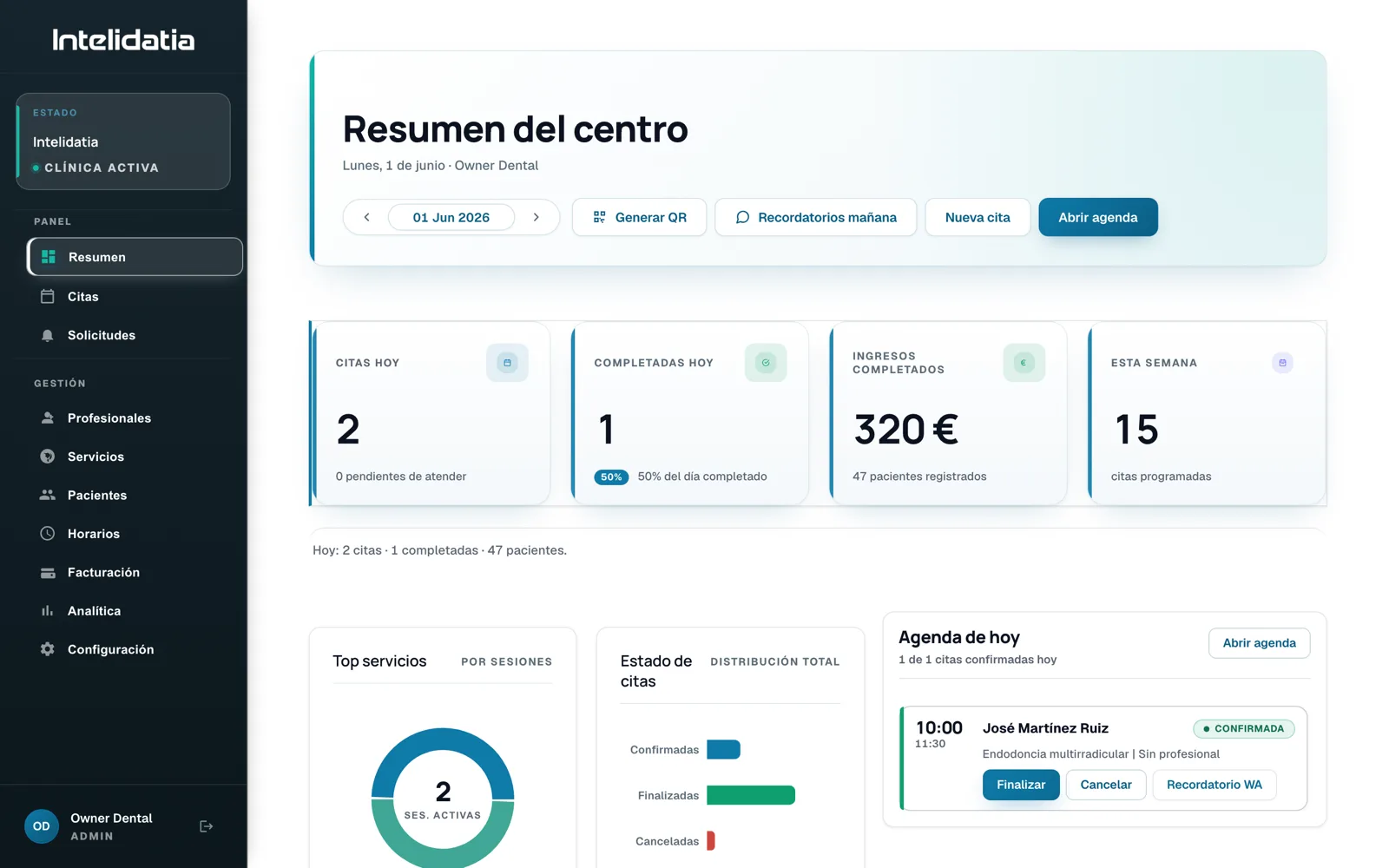
The summary shows today's appointments and what is pending: requests to confirm and alerts that need your attention.
02
Website requests arrive in the calendar. WhatsApp only connects if the corresponding pilot is contracted and activated.
03
Reminders, time tracking and advanced client records are added only if they appear in the approved scope.
On screen
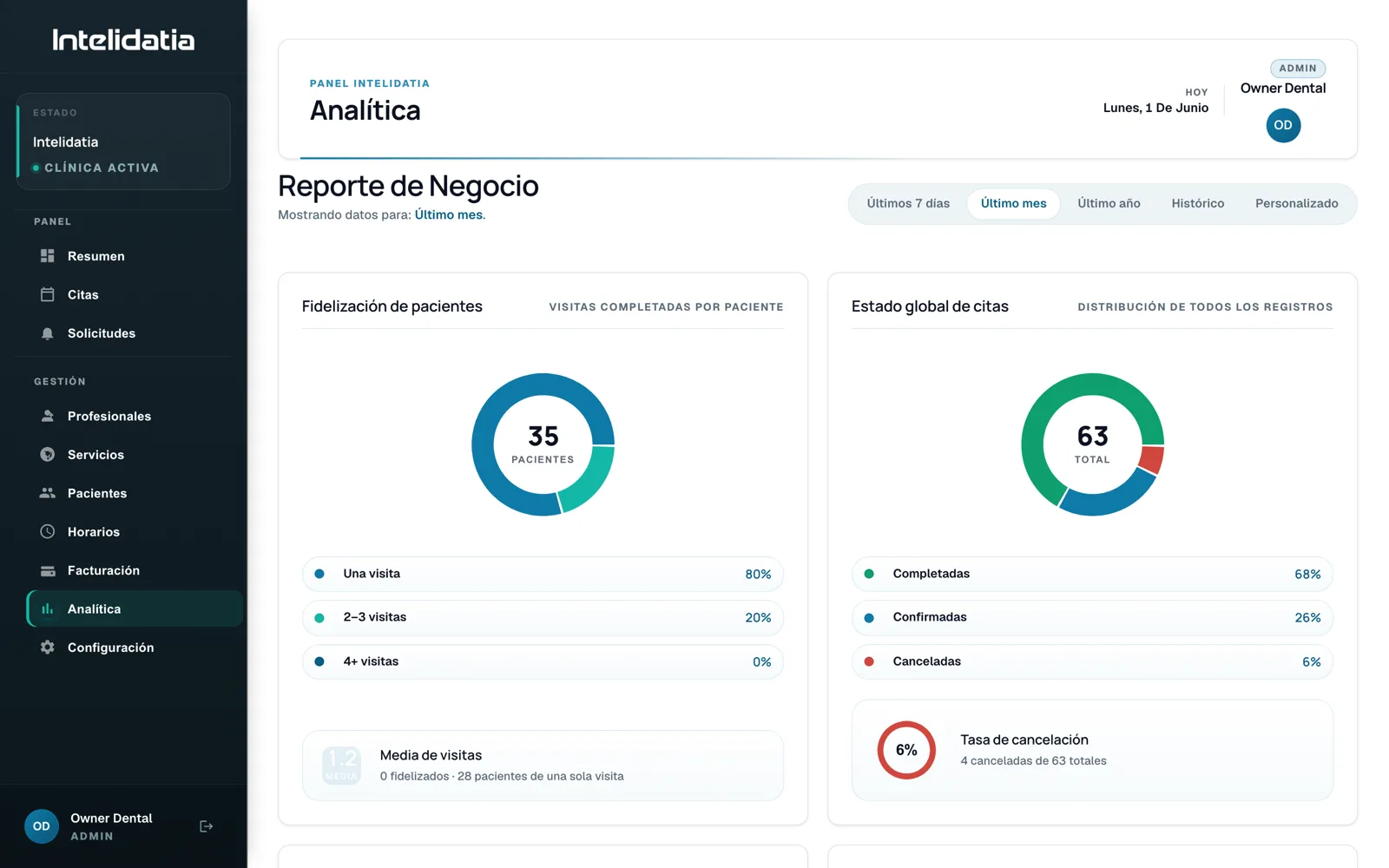
Real screenshots of the management dashboard, with fictitious data from the dental SYSTEM.
Features
Technical catalogue available. Only the calendar, requests and basic statuses are part of the base product; each additional module must appear in the approved proposal.
You open the dashboard and see the day at a glance: today's appointments, business indicators and what requires your attention.
Calendar view with appointments for each professional. You create, move and cancel appointments directly in the calendar.
Bookings from your website appear as pending requests with a count: you confirm them or propose another time.
Optional module for data and operational history. Documents and consents require specific scope and review.
Optional module subject to channel, provider, permissions, cancellations and tests.
Optional module subject to rules, consent and human supervision.
You add your team with role-based access: each professional sees their calendar and appointments; the configuration stays in your hands.
You define the schedule of each professional, with predefined shifts and exceptions (vacations, holidays, absences).
Separate working-time-record module. Its activation, configuration and compliance are validated for each company.
Loyalty programme to reward repeat customers, managed from the dashboard itself.
Your services with their duration and price, organised by category. This is what powers online booking.
When an appointment is added or changed, the dashboard shows it instantly, without reloading the page.
The dashboard sends the operational emails for you: confirmations, cancellations and notifications to the team.
You activate push notifications on your phone and find out about new bookings wherever you are.
How appointments and clients change over time: what grows, what stagnates and what you can use to make decisions.
You decide how bookings work: minimum notice, how far ahead people can book, slot duration and the buffer between appointments.
Business data, opening hours and preferences, editable by you without depending on anyone.
Comparison
Point by point, what changes when the entire operation lives in the same place.
| Dimension | Intelidatia | Notebook / Excel / separate apps |
|---|---|---|
| Where is the calendar | In one dashboard, with appointments from every channel | Notebook on the counter or separate calendar |
| Reminders | Optional module subject to channel and testing | By WhatsApp, when there is time |
| Customer records | Optional module with defined scope and controls | Data distributed between paper and mobile |
| Team | Schedules in the dashboard; time tracking as a separate module | A separate rota and another app for clocking in |
| Billing | Not included in the base product | Another program, with the data entered again by hand |
| Who sees the whole business | You, on a screen | Nobody: each tool only shows one part |
Complete System
The website and requests flow into the dashboard. WhatsApp and the other automations are optional modules.
Frequently asked questions
What we are usually asked about the dashboard: what it includes, who accesses it and whose data it belongs to.
It is the screen where requests, calendar and appointment statuses are managed. Other channels and modules—client records, alerts, time tracking, billing or analytics—are only added if they are part of the approved proposal.
The base product includes the website, requests or reservations, calendar and basic statuses. The rest of the technical catalogue consists of optional modules and should not be considered included until their scope is approved.
No. The dashboard works in the browser on your phone, tablet or computer. You can add it to your phone's home screen and activate notifications so you know about reservations immediately.
Access and roles depend on the approved dashboard. Working-time records and billing are separate modules, not functions included by default.
The base product limits the data to contact and appointment. Records, documents or consents require specific scope, controls and contractual documentation before being processed.
No. The base product does not issue invoices or record payments. The company keeps its tax software; any integration or adaptation work requires specific discovery, scoping and validation.
Yes: dental clinics, physiotherapy, veterinary, hairdressers, aesthetics, psychology, nutrition, barbershops and any business with appointments, throughout Spain. The dashboard adapts to your services, schedules and way of working.
The dashboard is part of the System (website + bookings + dashboard) and works best when bookings arrive automatically through the website and WhatsApp. In a short call, we review your case and tell you what fits.
It is part of the Intelidatia System, with a tailored price and no commissions per appointment or per client. We give you the exact number in a 10-minute call, without obligation.
Let’s talk
Tell us what you need. No commitment. A WhatsApp message is enough.
Direct contact
Save manual work, connect tools, control operations or open a new channel. Let’s start with the result.
We use essential technical cookies and, only with your permission, analytics cookies (Google Analytics) to understand and improve the site. Nothing optional is activated until you decide. Read the cookie policy.